Turning unanswered questions into leads: inside MooseChat's approach to small business websites
Most small business websites lose people at the same moment. A visitor has a question the site doesn’t answer, and the only way forward is a contact form that asks them to start again from nothing. A lead generation chatbot is supposed to catch that moment. Some are built the other way round, and ask for an email before they help.
MooseChat helps first. It answers from your own pages, and when it can’t, the unanswered question becomes the lead. This post explains how that works on a small business website and what happens to the lead afterwards.
What is a lead generation chatbot?
A lead generation chatbot is a chat on your website that talks to visitors and collects contact details from the ones who want to hear back from you. There are two broad kinds. Scripted bots walk every visitor through the same questions, like a form with speech bubbles. An AI chatbot for lead generation answers whatever the visitor types and asks for details when it has a reason to.
MooseChat is the second kind, with one constraint that shapes everything below: it answers only from your website and the business details you confirm, and it cites the page behind every answer. (Why that matters is in no answer, no guess.)
Why unanswered questions make good leads
Someone who types “Can you replace a tile roof in Pasadena next week?” has told you what they need, where, and when. They are much closer to buying than someone browsing your services page.
Questions like that are also the ones a website rarely answers. A price for their exact job, a date, whether you work in their town, whether you take their insurance: these depend on details only you can check. When the site has no answer, a contact form loses most of what the visitor just told you. A chatbot that turns the question into a lead keeps the question and the conversation around it, and you can call back already knowing what they want.
How MooseChat turns a miss into a lead
It answers what it can
Most questions have an answer somewhere on your site, and the bot gives it with a link to the page. A visitor who gets their answer doesn’t need to be asked for anything, so MooseChat doesn’t ask.
When it can’t answer
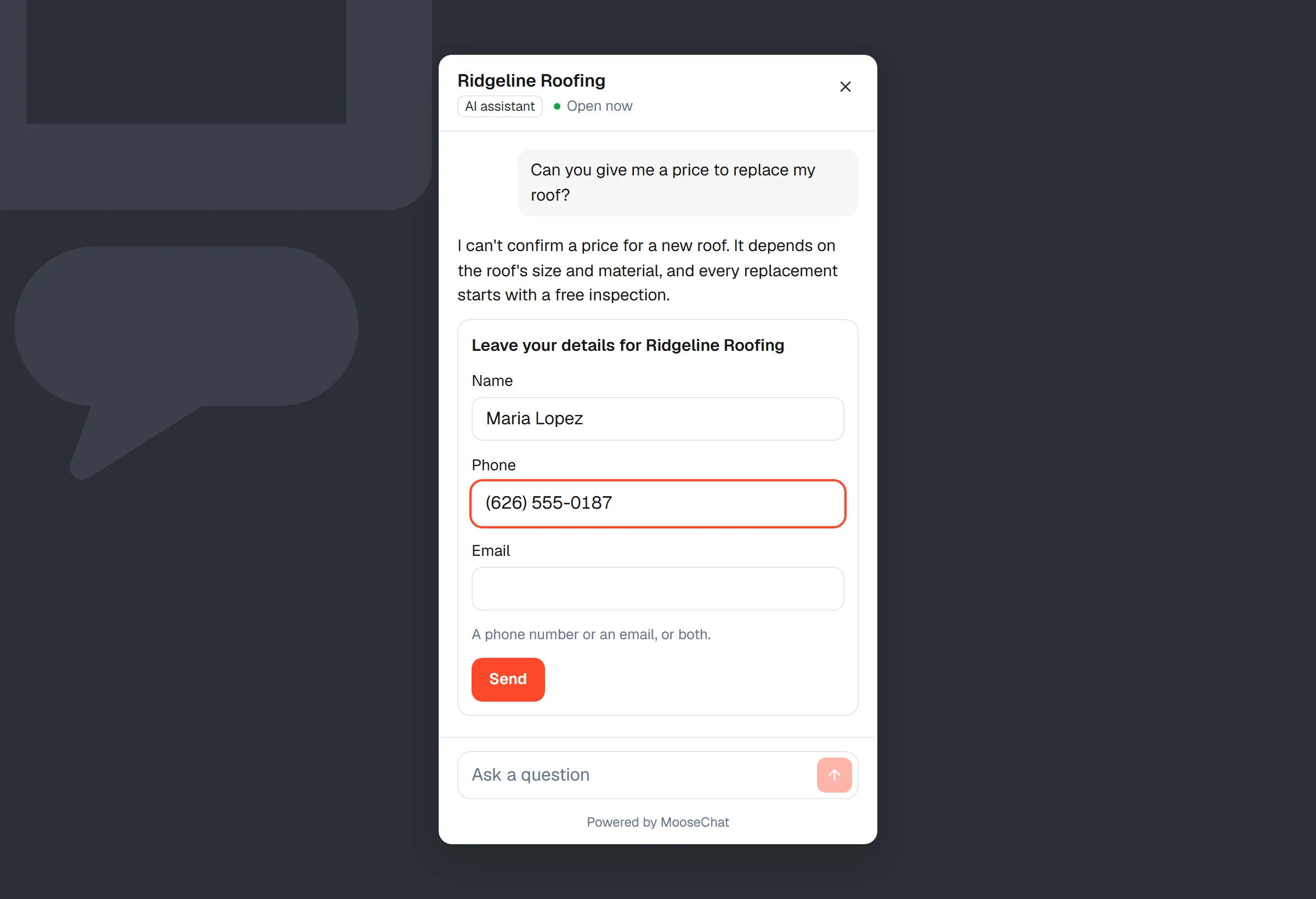
The first time in a conversation that it can’t answer, it says so and adds “If there’s anything else you’d like to know, just ask.” That leaves room for a second question it can answer before anyone is asked for details.
The second time, it opens a short form: name, and phone or email. You can add fields for a postcode, the service they want, their company, an order number or a note.
When the visitor asks for a person or a quote
A visitor who asks to talk to someone, or to be called back, gets the form at once. A visitor who asks for a quote gets their answer as usual, with the form offered underneath.
When a topic always matters to you
You can list topics in plain words where you always want the visitor’s details, such as “anything about insurance claims” or “commercial jobs over 10,000 sq ft”. When a question fits, the bot still answers from your content and offers the form under the reply. These rules can’t make the bot promise anything or answer from outside your content.
Where the leads go
MooseChat saves every lead before it tries to deliver it, so each one appears in your Leads inbox whatever happens to the email. From there it goes to:
- your email, from the moment you create the bot
- other addresses you add, each confirmed by its owner first, so a typo never sends a visitor’s details to a stranger
- a webhook, as a signed JSON request
- a MooseForm form, if you use one
Failed deliveries are retried five times over about an hour. Each lead carries the conversation, so you see what the visitor asked before you call.
If you’d rather answer yourself, you can reply from the conversation page or take it over from the bot. When the visitor has left and gave an email, your reply reaches them by email. You can also connect a Calendly or Cal.com booking page, and visitors can book a time inside the chat.
The list of questions it couldn’t answer
Every question the bot couldn’t answer, or only partly answered, goes into a list in your dashboard. Questions are grouped by meaning, so rewordings like “Do you offer financing?” and “Can I pay monthly?” usually show up as one item, with how many conversations asked it in the last 30 days.
Press “Answer this”, write the answer once, and the bot uses your words from then on. If people keep asking after that, the question comes back marked “Asked again after you answered”. A weekly email on Monday morning lists the week’s unanswered questions, with conversations, answered rate and leads next to the week before.
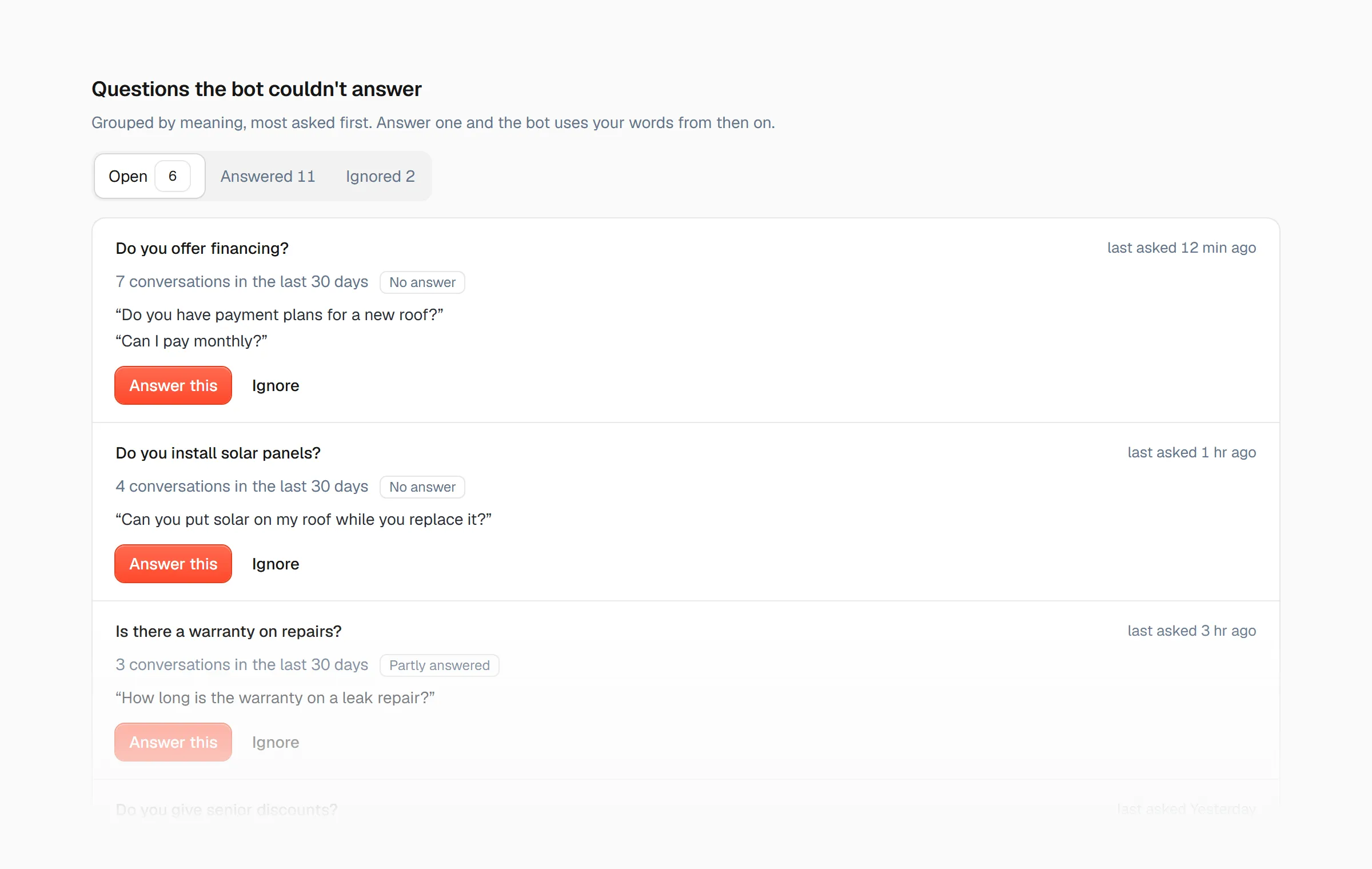
Over a few weeks the list doubles as a to-do list for your website: the answers you add there are usually worth adding to your pages too.
Chatbot or lead capture form?
A lead capture form still has its place on a contact page. The difference is when it appears and what comes with it.
| Lead capture form | MooseChat | |
|---|---|---|
| When it appears | When the visitor finds your contact page | When the bot can’t answer, or the visitor asks for a person |
| What it captures | The fields the visitor fills in | The visitor’s details plus the whole conversation |
| What you learn | One message | Which questions your site leaves unanswered, grouped and counted |
You don’t have to choose. Keep your form and let the chat capture leads from website visitors who never reach it.
What to look for in an AI chatbot for small business lead capture
Whichever chatbot for small business websites you try, check these before you put it in front of customers:
- It answers from your own content and says when it doesn’t know, instead of guessing to keep the visitor talking.
- It asks for details when there’s a reason, so visitors who got their answer aren’t put off.
- It stores every lead before trying to send it.
- It shows you which questions it missed, so the site gets better over time.
- It goes on the site you already have, with no rebuild.
- Its price is predictable. MooseChat counts conversations a month: Solo is $39 a month for 1,000, with a 7-day free trial.
Start with the questions you already get
You probably know the three questions customers ask most on the phone. Ask the bot those first. The chat in the corner of this page is MooseChat answering from this site, and the 7-day trial lets you try it on yours. Setup takes a few minutes, and adding it to your website is one script tag.
Frequently asked questions
What is a lead generation chatbot?
A chat on your website that talks to visitors and collects contact details from the ones who want a reply, a quote or a call back. Some follow a fixed script; an AI chatbot for lead generation answers whatever the visitor asks and asks for details when that helps.
Does MooseChat ask every visitor for their email?
No. It asks when it couldn't answer twice in one conversation, when the visitor asks for a person, or when a question touches a topic you listed. A visitor who asks for a quote sees the form offered under the answer.
Where do the leads go?
Every lead is saved to the Leads inbox in your dashboard first. From there it goes to your email, more addresses you add, a webhook, or a MooseForm form. Delivery is retried five times over about an hour if it fails.
Can I reply to the visitor myself?
Yes. You can reply from the conversation page or take the conversation over from the bot. If the visitor has left and gave an email, your reply reaches them by email.
How much does MooseChat cost for a small business?
There is a 7-day free trial. Solo is $39 a month for 1,000 conversations, Pro is $99 for 3,000, and Agency is $249 for 10,000 shared across client sites.