No answer, no guess: how MooseChat builds trust with a chatbot that cites its sources
Ask a general AI chatbot something it doesn’t know and it will often answer anyway. That habit is called chatbot hallucination, and it is the main reason small business owners hesitate to put an AI chatbot on their website. To a customer, a wrong answer from your website chatbot is your business’s answer.
I built MooseChat around one rule: if the answer isn’t on your site, the chatbot says so. This post covers what chatbot hallucination is, what it cost one company that got it wrong, and the checks MooseChat runs so every answer can be traced back to your own pages.
What is chatbot hallucination?
Chatbot hallucination is when an AI chatbot gives an answer that sounds confident but is false or made up. A language model writes the most likely next words. When it has no fact to go on, the most likely words still form a fluent answer, and nothing in that answer tells the reader it was a guess.
A general chatbot can hallucinate about anything. An AI chatbot for a website tends to go wrong in the same few places:
- prices the site never lists
- opening hours, delivery times and turnaround times
- refunds, warranties and cancellations
- services the business doesn’t offer
- links to pages that don’t exist
These are the questions customers ask most, and the ones where a wrong answer does the most damage.
What a wrong answer costs: the Air Canada chatbot case
In November 2022, after his grandmother died, Jake Moffatt asked the chatbot on Air Canada’s website about bereavement fares. The chatbot told him he could buy a full-price ticket and claim the bereavement discount afterwards, within 90 days. Air Canada’s actual policy didn’t allow refunds after travel, and the airline refused his claim. When he took it to British Columbia’s Civil Resolution Tribunal, Air Canada argued that the chatbot was a separate legal entity, responsible for its own actions.
The tribunal rejected that in February 2024 (Moffatt v. Air Canada, 2024 BCCRT 149). The chatbot was part of Air Canada’s website, so Air Canada was responsible for what it said. The tribunal found the airline liable for negligent misrepresentation and ordered it to pay him the fare difference, plus interest and fees.
The sum was small. For a small business the ruling still matters, because a plumber or a dentist can’t absorb a chatbot promising discounts the way an airline can.
How MooseChat keeps its answers grounded
Grounded AI answers from a defined set of sources instead of from whatever the model picked up in training. MooseChat is grounded in your website, and it enforces that in six ways.
It answers only from your content
When you set up a bot, MooseChat reads your website. You can add files, pasted text and your own questions and answers. Those, plus the business details you confirm, are all it answers from. It has no general knowledge and it doesn’t search the web. Ask it something unrelated to your business and it steers the visitor back to what it can help with.
The details MooseChat finds on your site, such as your phone number, hours and service area, start out unconfirmed. It uses one in an answer only after you confirm it. An unconfirmed service area would be worse than none, because the bot could tell someone outside your area that you cover them.
Text on a crawled page is treated as data, never as instructions. A page that says “ignore your rules” doesn’t change what the bot does.
Every answer cites a page
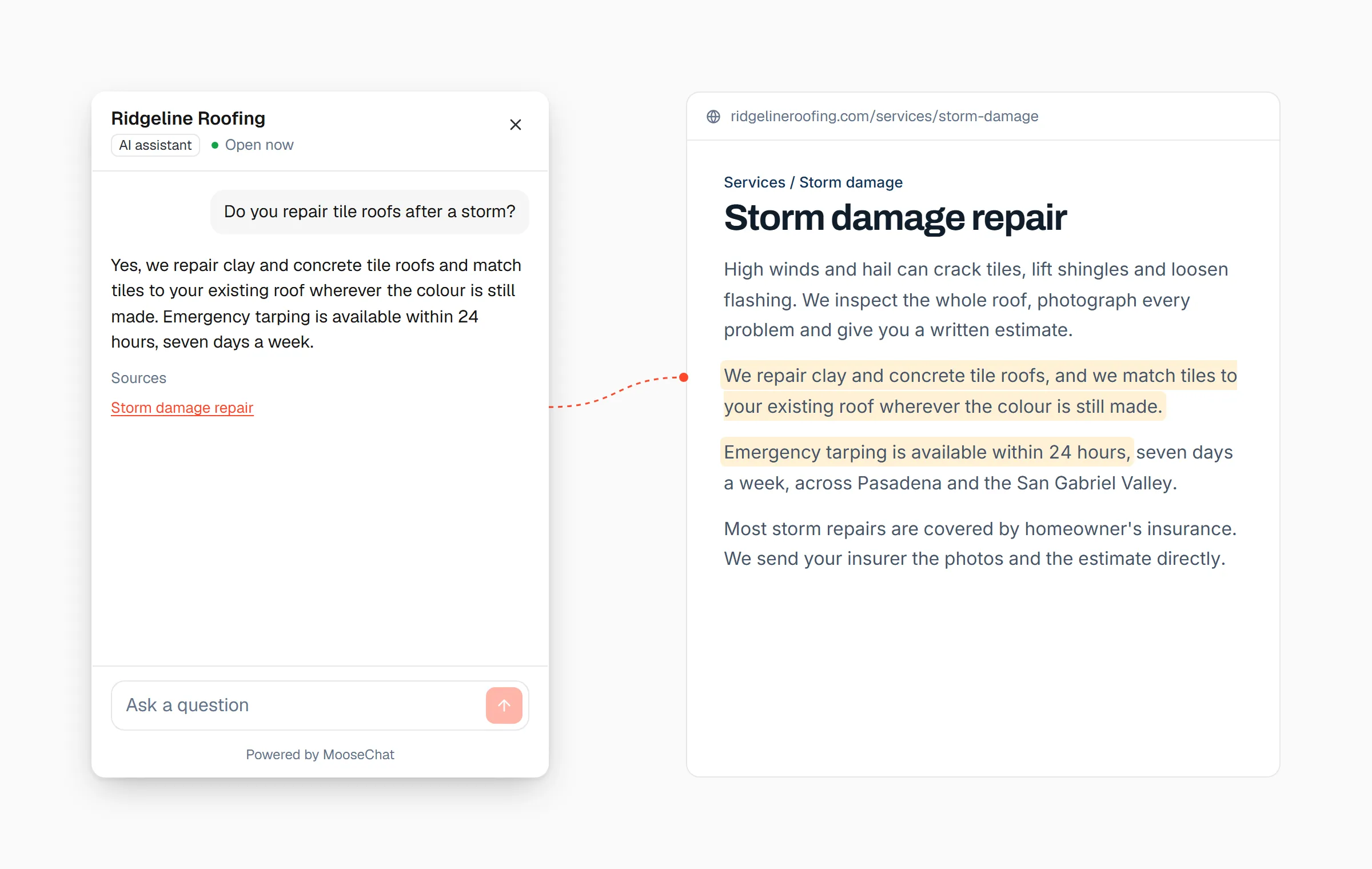
Under each answer the visitor sees its sources, linked to the pages on your site it came from. They can click through and read your own words. You can check too: every conversation in the dashboard shows which pages each answer used. That link is the simplest test of an AI that cites sources: the page either says what the answer says or it doesn’t.
If the model can’t tie an answer to a source, MooseChat doesn’t show it as an answer.
Numbers have to match your sources
Prices, phone numbers, times and percentages are where a made-up answer hurts most, so MooseChat checks them in code. Every number in a reply must appear in the sources the model was given, in your confirmed details, or in the visitor’s own message. “$1,200” and “1200 dollars” count as the same value. A figure that appears nowhere fails the check.
Each sentence is checked against the sources
A second model reads the reply one sentence at a time and asks whether that sentence claims something about your business that the sources don’t state. If any sentence fails, MooseChat withholds the reply. The visitor sees “I can’t confirm that. Leave your details and [your business] will get back to you.” with a short form in its place.
This check has a time limit of a second and a half. If it can’t finish in time, the answer stands, and the number check has already run by then.
Links go only to your own site
A reply can link only to your own website and your booking page. Any other link is removed, so a page somewhere on the web can’t turn your chatbot into a way to send visitors elsewhere.
The model can only answer
It has no tools that change anything. It can’t issue a refund, change a booking or send an email. The most it can do is ask for the contact form, and the widget shows it.
What visitors see when it doesn’t know
A chatbot that won’t guess needs something better to say than “I don’t know”. MooseChat handles a miss in two steps.
The first time in a conversation that it can’t answer, it says so plainly and adds “If there’s anything else you’d like to know, just ask.” The second time, it opens a short form for the visitor’s name and phone or email. If the visitor asks to speak to a person, the form opens straight away. If they ask for a quote, it is offered under the answer.
The question then goes two places: into your Leads inbox with the whole conversation, and into a list of questions the bot couldn’t answer. Answer one there and the bot uses your words from then on. I wrote more about this in turning unanswered questions into leads.
How to prevent AI hallucinations on your website chatbot
Whichever tool you use, these steps cut the risk.
- Limit the chatbot to your own content. A bot that can fall back on general knowledge will fill gaps with it.
- Require a source for every answer, and show it to the visitor.
- Check numbers and policies against the sources in code. An instruction in the prompt asks the model to behave; a check in code holds whatever the model writes.
- Give the bot a useful way to say it doesn’t know, such as a contact form, so a missing answer doesn’t end the conversation.
- Before it goes live, ask it the questions your customers ask, especially about prices, hours and policies, and open the sources it cites.
- Read the questions it couldn’t answer every week and add the answers to your site.
- Have it read your site again after you change it, so it doesn’t quote an old price. MooseChat re-reads your site monthly on Solo, weekly on Pro and daily on Agency, and you can ask for a fresh read once an hour.
Try it on your own website
The quickest way to judge a grounded chatbot is to ask it hard questions about your own business. The chat in the corner of this page is MooseChat, answering from this website, so you can start there.
MooseChat has a 7-day free trial. Paste your address, ask what your customers ask and look at the sources under each answer. Plans start at $39 a month (pricing), and adding it to your site takes one script tag.
Frequently asked questions
Can a chatbot hallucinate even when it uses your own data?
Yes. Retrieval gives the model the right pages, but the model can still add a detail that isn't in them. That is why MooseChat also checks the finished reply: every number must appear in the sources, each sentence is checked against them, and a reply that fails is withheld.
Will MooseChat make up a price?
It gives a price only when your site or your confirmed business details state one, and every number in a reply has to appear in its sources. When your site lists no price, it says so and offers the visitor a way to ask you for a quote.
What is grounded AI?
Grounded AI answers from a fixed set of sources and points to them, instead of answering from whatever the model learned in training. MooseChat is grounded in your website, the files and text you add, and the business details you confirm.
Who is responsible when a website chatbot gives a wrong answer?
In Moffatt v. Air Canada (2024), the tribunal held the airline responsible for what its chatbot told a customer. It is safest to treat your chatbot's answers as your own. This is not legal advice.
Does MooseChat reply in other languages?
Yes. It replies in the visitor's language, from the same sources, with the same checks.